Pattern editor
A pattern is a string of text to match URLs or apps.
To edit a pattern, click the pencil icon.
Type
Choose the pattern type.
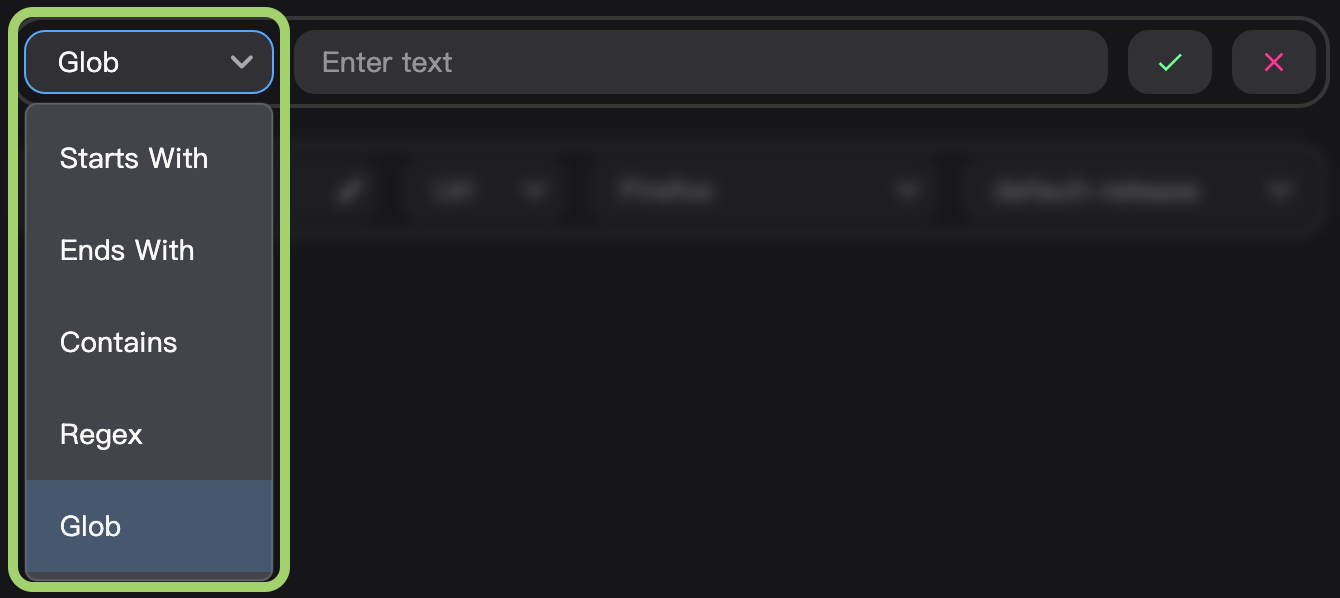
The choices are:
- Starts With matches any URL starting with the string.
- Ends With matches any URL ending with the string.
- Contains matches any URL containing the string.
- Glob. Treats asterisks
*as wildcards. There is an implicit*before and after the given string.- For example,
examplewill match any url containingexample, e.g.example.organdnotexample.com. - For example,
foo*barwill matchfoobaz.comandnotfoobarbaz.org
- For example,
- Regex, i.e. regular expressions. Offers the most flexibility. For help creating these, follow our Regex Guide.
Text
Fill in the text that will match a URL.

Click confirm to apply the changes.

To cancel, click the cancel button.
